Good call. I'm looking at similar pin limitations in my proposed design. If you do work out an SD card setup, I wouldn't mind seeing how you accomplished it.
Sparkfun has a serial enabled 20X4 LCD for $32.95 or eBay has a serial enabled 20X4 for about 28. I'm using a 24X2 that was only $4 though.
So where did you get a display for $4.00? That's unbelieveable. Do you have a part number for it?
Another concern about the Arduino is that I do not know how large the program can be and can memory be increased if needed?
My experience:
I have done limited programming (Basic) and tried to learn a little "C". I know basic electronics and have done some interfacing and electronic projects as well as holding an amateur radio license. I also took a class at the local college in digital electronics and did well in that class (It was really fun and interesting).
About designing the brewing program:
I was thinking of using loops within a loop in the program to jump to various parts of the program to select a given mash schedule. This way you could have standard infusion mashing as well as step temperature mashing subroutines. I would have one of the input buttons labeled as "Brew Mode" and once you got to the desired mode displayed you would press the "Start Brewing" button. When that routine finished then it would jump out of the loop to the add finish hops and then to the chilling subroutine. I would think I would need some help from an experienced "C" programmer at times so if there are any reading this who would like to help develop a freeware "Brewing program" using the Arduino then please chime in. This is as much fun to me as brewing and computers.
__________________
Cheers,
WBC
Fermentor 1: Bill's House Ale II, Fermentor 2: German Helles, Fermentor 3: Bill's Schworzbier (Black Bier) Tap 1: Bill's House Ale II, Tap 2: German Hefewizen, Tap 3: Nut Brown Ale Future Brews: Stone IPA Clone, Blonde Ale, Budvar Clone, Newcastle Clone New toy: Blichmann 27 gallon fermentor
“If you find yourself in a hole, the first thing to do is stop digging”
“Good judgment comes from experience, and a lotta that comes from bad judgment”
So where did you get a display for $4.00? That's unbelieveable. Do you have a part number for it?
Another concern about the Arduino is that I do not know how large the program can be and can memory be increased if needed?
My experience:
I have done limited programming (Basic) and tried to learn a little "C". I know basic electronics and have done some interfacing and electronic projects as well as holding an amateur radio license. I also took a class at the local college in digital electronics and did well in that class (It was really fun and interesting).
About designing the brewing program:
I was thinking of using loops within a loop in the program to jump to various parts of the program to select a given mash schedule. This way you could have standard infusion mashing as well as step temperature mashing subroutines. I would have one of the input buttons labeled as "Brew Mode" and once you got to the desired mode displayed you would press the "Start Brewing" button. When that routine finished then it would jump out of the loop to the add finish hops and then to the chilling subroutine. I would think I would need some help from an experienced "C" programmer at times so if there are any reading this who would like to help develop a freeware "Brewing program" using the Arduino then please chime in. This is as much fun to me as brewing and computers.
I bought This display from All Electronics. Used but it great shape. I bought two. Includes EL backlight but no inverter.
There is a 16K limitation on the Arduino, 2K of which is used by the bootloader. There is only 1K or RAM for variables and tables and such and 512 bytes of EEPROM. My code uses just over 6K and is probably pretty well bloated.
Due to the limited number of pins, it would be best to have a single button cycle through your choices and accept inputs as well. That's why I chose to use a rotary encoder. The one I'm using also has a push button so I can cycle through selections and then press to accept or move on depending on what's happening. The best way to read the encoder is using interrupts, this way you can pickup each change in state and use the full resolution of the encoder. I'm using SWITCH / CASE commands as the backbone of selection where things are at. It's pretty straight forward. I also have encoder limits programmed depending on the circumstances. For example, when inputting a temperature setpoint, it will not accept less than 0 or more than 212.
I tried to post the code but couldn't post more than 10000 characters. I'll post the current version on BrewCommune Again, this is my first attempt at any real coding and I'm sure someone that actually knows how to program will laugh their arse off, but hey, it's working for me!
I'm sure you did the best you could at building and coding and should not be ashamed of anything. A lot of people could not accomplish what you have done and usually those who make fun of others are not kind to others as a general rule and they will have a hard time in life anyway.
I think I will try to order next week and gather what I still need to get started. "Nothing ventured, nothing gained".
__________________
Cheers,
WBC
Fermentor 1: Bill's House Ale II, Fermentor 2: German Helles, Fermentor 3: Bill's Schworzbier (Black Bier) Tap 1: Bill's House Ale II, Tap 2: German Hefewizen, Tap 3: Nut Brown Ale Future Brews: Stone IPA Clone, Blonde Ale, Budvar Clone, Newcastle Clone New toy: Blichmann 27 gallon fermentor
“If you find yourself in a hole, the first thing to do is stop digging”
“Good judgment comes from experience, and a lotta that comes from bad judgment”
Again, this is my first attempt at any real coding and I'm sure someone that actually knows how to program will laugh their arse off, but hey, it's working for me!
I program supercomputers for a living, and (after spending about 2 minutes scanning it) it looks fine to me. There might be some areas where we can reduce program size, but I'm not real familiar with optimizing for the Arduino yet. (My dev board is on it's way, tho!) You've got lots of memory left, so... if it's functional, I wouldn't mess around too much trying to optimize things.
WBC, I definitely plan to make my reference designs and code available for all of my automation projects. I'm not sure if I want to maintain a full-blown SourceForge project, but I'll probably make my SVN repository read-only (and invite feedback/suggestions/comments/interaction here, on my dev blog or via email).
You know, I wonder if 10 to 15 years from now we'll look back and chuckle at those that did things manually, much in the same way we look at 70s-era homebrewers using cheesecloth over plastic buckets now that we have Better Bottels, etc., and airlocks/blowoff tubes?
I already use a PID to keep my HLT at a set point - it's not too much of a stretch to automate the running of the pump, MLT and BK given a set of criteria to brew from.
Congrats on your project. Very impressive. I have to admit though, I am quit lazy when it comes to wanting to program computers. I have automated though, I have a BCS-460 from ECC Inc. Check it out. It doesn't have the cool LCD screen, but it does do some incredible things. Cheers, and keep up the great work on the project. I look forward to your next posts. S.
__________________
Nies
Primary: American Wheat
Secondary: Phils Pils Clone
Thanks Derrin for your information and the program to look at as well as the LCD display link. This really helps because it has been a long time since I coded anything. I believe when compared to the BCS-460 the Arduino will do a lot more because it is so versatile in it's design.
I will study the code and try to see how you write to the display as well as read temperature and control the burner to hold temperatures.
Did you use plug in relays or are they wired.(Part numbers?).
What compilers are available that will work for me? I am using Windows XP and prefer it but can also install Ubuntu Linux on another computer I have and use the open source "C" compiler.
__________________
Cheers,
WBC
Fermentor 1: Bill's House Ale II, Fermentor 2: German Helles, Fermentor 3: Bill's Schworzbier (Black Bier) Tap 1: Bill's House Ale II, Tap 2: German Hefewizen, Tap 3: Nut Brown Ale Future Brews: Stone IPA Clone, Blonde Ale, Budvar Clone, Newcastle Clone New toy: Blichmann 27 gallon fermentor
“If you find yourself in a hole, the first thing to do is stop digging”
“Good judgment comes from experience, and a lotta that comes from bad judgment”
WBC, I definitely plan to make my reference designs and code available for all of my automation projects. I'm not sure if I want to maintain a full-blown SourceForge project, but I'll probably make my SVN repository read-only (and invite feedback/suggestions/comments/interaction here, on my dev blog or via email).
Thanks Foosinho, I need all the help I can get sometimes.
__________________
Cheers,
WBC
Fermentor 1: Bill's House Ale II, Fermentor 2: German Helles, Fermentor 3: Bill's Schworzbier (Black Bier) Tap 1: Bill's House Ale II, Tap 2: German Hefewizen, Tap 3: Nut Brown Ale Future Brews: Stone IPA Clone, Blonde Ale, Budvar Clone, Newcastle Clone New toy: Blichmann 27 gallon fermentor
“If you find yourself in a hole, the first thing to do is stop digging”
“Good judgment comes from experience, and a lotta that comes from bad judgment”
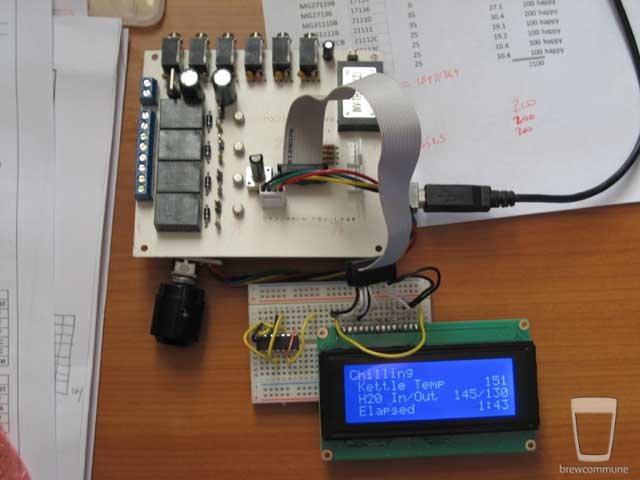
Go to the Arduino - HomePage website, they have a compiler and a ton of libraries all for free. I'm also using XP. I'll compile a list of part numbers and post them, but the relays are from Electronic Goldmine. They're 5V and only cost like $1.25 each. The Arduino can only source or sink 40mA so you have to use a transistor. There are several tutorials on the website about using transistors to drive relays. I have the PCB Express board patterns, but I don't have a good schematic. I'll try and put one together.
I like the BCS 460, I think it's pretty cool, but the real purpose of this project was to get my feet wet coding and have a project I could actually apply something I knew too. Just like building my entire brewery was an exercise in learning to TIG. I do what I do for control over the process and to learn something. The "iBrew" will probably never actually be done. The board in these photos is the 3rd I etched and built for this project and I already have ideas for the next one!